Graph Table Shape
Purpose
A graph table shape defines how the result of pattern matching should be transformed into tabular form. This is done through the COLUMNS clause.
Syntax
graph_table_shape::=

COLUMNS Clause
Purpose
The COLUMNS clause allows for defining a projection that transforms the result of graph pattern matching into a regular table that no longer contains graph objects like vertices and edges but instead regular data values only.
Syntax
graph_table_columns_clause::=

graph_table_column_definition::=
all_properties_reference::=

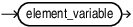
element_reference::=
Semantics
Syntactically, the COLUMNS clause starts with the keyword COLUMNS and is followed by an opening parenthesis, a comma-separated list of one or more graph_table_column_definition and a closing parenthesis.
A graph_table_column_definition defines either:
-
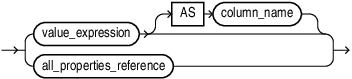
A single output column via an arbitrary value expression. The value expression may contain references to vertices and edges in the graph pattern, for example to access property values of vertices and edges. An optional alias,
AScolumn_nameprovides a name for the column. The alias can only be omitted if the value expression is a property reference, in which case the alias defaults to the property name. -
An
all_properties_referencethat expands to the set of all valid properties based on the element type (vertex or edge) and any label expression specified for the element. The set of properties is the union of properties of the vertex (or edge) labels belonging to tables that have at least one label that satisfies the label expression. In case some of these matching tables define a property while other tables do not, then NULL values will be returned for those tables that do not define the property.
An optional alias, AS column_name provides a name for the column. The alias can only be omitted if the value expression is a property reference, in which case the alias defaults to the property name.
Restrictions
Value expressions may not contain aggregations and cannot reference variables enclosed by a quantifier since group degree of reference is not allowed.
Examples
Example 1
The following example returns the name of each person as well as the height in feet by multiplying the height in meters by 3.281:
SELECT *
FROM GRAPH_TABLE ( students_graph
  MATCH (n IS person|person_ht)
  COLUMNS (n.name, n.height * 3.281 AS height_in_feet)
)
ORDER BY name;
In the query above, the COLUMNS clause defines two columns. Note that n.name is short for n.name AS name.
The result is:
NAME       HEIGHT_IN_FEET
---------- --------------
Alice              5.5777
Example 2
The following query matches all FRIENDS edges between two persons P1 and P2 and uses all properties references P1.* and E.* to retrieve all the properties of vertex P1 as well as all properties of edge E:
SELECT *
FROM GRAPH_TABLE ( students_graph
  MATCH (p1 IS person) -[e IS friends]-> (p2 IS person)
  COLUMNS ( p1.*, p2.name AS p2_name, e.* )
)
ORDER BY 1, 2, 3, 4, 5;
The result is:
PERSON_ID NAME DOB       HEIGHT P2_NAME FRIENDSHIP_ID MEETING_D
--------- ---- --------- ------ ------- ------------- ---------
        1 John 13-JUN-63    1.8 Bob	                1 01-SEP-00
        2 Mary 25-SEP-82   1.65 Alice               2 19-SEP-00
        2 Mary 25-SEP-82   1.65 John                3 19-SEP-00
        3 Bob  11-MAR-66   1.75 Mary                4 10-JUL-01
Note that the result for P1.* includes properties PERSON_ID, NAME and DOB of label PERSON as well as property HEIGHT of label PERSON_HT. Furthermore, the result for E.* includes properties FRIENDSHIP_ID and MEETING_DATE of label FRIENDS.
Example 3
The following query matches all vertices in the graph and retrieves all their properties:
SELECT *
FROM GRAPH_TABLE ( students_graph
  MATCH (v)
  COLUMNS ( v.* )
)
ORDER BY 1, 2, 3, 4, 5;
The result is:
 PERSON_ID NAME       DOB       HEIGHT     ID
---------- ---------- --------- ---------- ----------
         1 John       13-JUN-63        1.8
         2 Mary       25-SEP-82       1.65
         3 Bob        11-MAR-66       1.75
         4 Alice      01-FEB-87        1.7
           ABC                                      1
           XYZ                                      2
Note that since PERSON vertices do not have an ID property, NULL values (empty strings) are returned. Similarly, UNIVERSITY vertices do not have PERSON_ID, DOB and HEIGHT properties so again NULL values (empty strings) are returned.